级联选择 MultiplePicker
1.说明
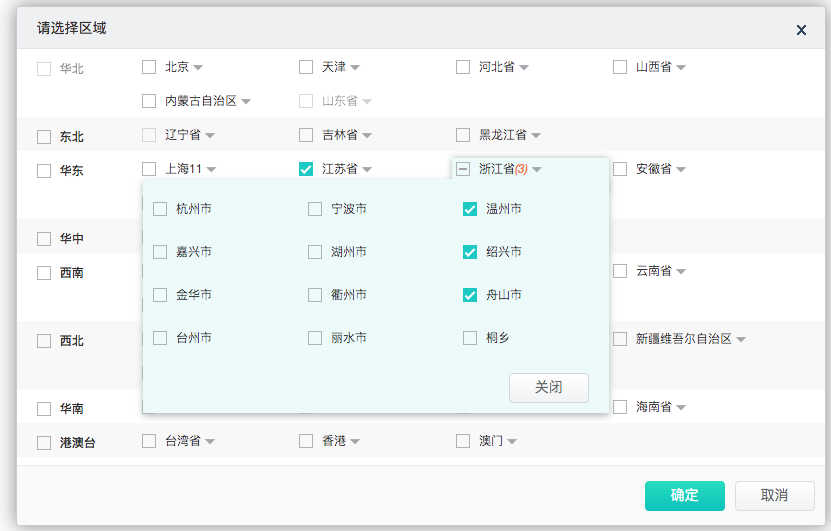
级联复选框。
何时使用
需要从一组相关联的数据集合进行选择,例如省市区,公司层级,事物分类等。
从一个较大的数据集合中进行选择时,用多级分类进行分隔,方便选择。
比起 Select 组件,可以在同一个浮层中完成选择,有较好的体验。
2.API
| 属性名称 | 数据类型 | 是否必填 | 默认值 | 回传参数 | 说明 |
|---|---|---|---|---|---|
| width | number | 否 | null | 空 | 宽度 |
| height | number | 否 | null | 空 | 高度 |
| valueField | string | 否 | value | 空 | 数据字段值名称 |
| textField | string | 否 | text | 空 | 数据字段文本值名称 |
| url | string | 否 | null | 空 | 数据源请求url |
| params | object | 否 | null | 空 | 查询参数 |
| secondUrl | string | 否 | null | 空 | 二级节点数据源请求Url |
| secondParams | object | 否 | null | 空 | 二级节点查询参数 |
| secondParamsKey | string | 否 | null | 空 | 第二层节点的后台参数中传递一级节点value值的参数名称 |
| thirdUrl | string | 否 | null | 空 | 三级节点数据源请求Url(三级还没实现) |
| thirdParams | string | 否 | null | 空 | 三级节点查询参数(三级还没实现) |
| thirdParamsKey | string | 否 | null | 空 | 第三层节点的后台参数中传递二级节点value值的参数名称 |
| dataSource | string | 否 | data | 空 | ajax的返回的数据源中哪个属性作为数据源,为null时直接后台返回的数据作为数据源 |
| addressListAttr | string | 否 | addresslirarys | 空 | 当classify为true时,数据源中的哪个属性作为分类下面的数据 |
| data | string | 否 | null | 空 | 自定义数据源 |
| classify | bool | 否 | null | 空 | 组件是否分类别显示 |
| onSelect | func | 否 | null | data | 选中后回调函数 |
| value | array | 否 | [] | 空 | 第一级的value值 |
| secondValue | array | 否 | [] | 空 | 第二级的value值 |
| disabledValue | array | 否 | [] | 空 | 第一级不可操作的数据 |
| disabledSecondValue | array | 否 | [] | 空 | 第二级不可操作的数据 |
| okHandler | func | 否 | null | data | 组件选择后,点击确定按钮的回调函数 |
只读属性
| 方法名 | 参数名 | 参数说明 | 返回值类型 | 说明 |
|---|---|---|---|---|
| open | 空 | 空 | 空 | 打开 |
| close | 空 | 空 | 空 | 关闭 |
| getData | 空 | 空 | array | 获取当前选取器选取的值 |
3.代码演示
/**
 * Created by ALOG on 17/6/5.
 */
let React =require( "react");
let ReactDOM=require("react-dom");
let wasabi=require("wasabiD");
let DataGrid=wasabi.DataGrid;
let Button=wasabi.Button;
let ToolTip=wasabi.ToolTip;
let MultiplePicker=wasabi.MultiplePicker;
let ListSort=require("../components/ListSort.js")
var alogUtil = require("../libs/alogUtil.js");

class Demo extends React.Component {
    constructor(props) {
        super(props);
        this.openMultiPicker=this.openMultiPicker.bind(this);
        this.multiplePickerOkHandler=this.multiplePickerOkHandler.bind(this);
    }
    openMultiPicker(){
        this.refs.MultiplePicker.open();
    }
    multiplePickerOkHandler(data){

    }
    render(){
        var testValue=[{"value":"001010","text":"江苏省","expand":false,"childrens":null,"checked":true,"disabled":false}];
        var testSecondValue=[
            {
                "value":"001011",
                "text":"浙江省",
                "expand":false,
                "childrens":[
                    {
                        "value":"001011089",
                        "text":"温州市",
                        "expand":false,
                        "childrens":null,
                        "checked":true,
                        "disabled":false
                    },
                    {
                        "value":"001011092",
                        "text":"绍兴市",
                        "expand":false,
                        "childrens":null,
                        "checked":true,
                        "disabled":false
                    },
                    {
                        "value":"001011095",
                        "text":"舟山市",
                        "expand":false,
                        "childrens":null,
                        "checked":true,
                        "disabled":false
                    }
                ],
                "checked":false,
                "disabled":false
            }
        ];

        var disabledValue=[
            {
                "value":null,
                "text":"全国",
                "expand":false,
                "childrens":null,
                "checked":true
            },
            {
                "value":"001015",
                "text":"山东省",
                "expand":false,
                "childrens":null,
                "checked":true,
                "disabled":false,
                "childrensNum":""
            }
        ];

        var disabledSecondvalue=[
            {
                "value":"001006",
                "text":"辽宁省",
                "expand":false,
                "childrens":[
                    {
                        "value":"001006037",
                        "text":"沈阳市",
                        "expand":false,
                        "childrens":null,
                        "checked":true
                    },
                    {
                        "value": "001006038",
                        "text": "大连市",
                        "expand": false,
                        "childrens": null,
                        "checked": true
                    }
                ],
                "checked":false,
                "disabled":false,
            }
        ];
        return (
            <div>
                <Button name="test" title="打开级联选择组件" onClick={this.openMultiPicker}/>
                <MultiplePicker
                    ref="MultiplePicker"
                    url={alogUtil.orderUrl() + "/tms-portal/expressStrategy/queryArea.htm" + alogUtil.getOMSParams()}
                    backSource = "data"
                    params = {{level:'AREA',parentCode:'001'}}
                    classify={true}
                    textField = "name"
                    valueField = "code"
                    secondUrl = {alogUtil.orderUrl() + "/tms-portal/addressLibrary/queryAddressLibrary.htm" + alogUtil.getOMSParams()}
                    secondParams = {{level: 'CITY'}}
                    secondParamsKey = "parentCode"
                    value={testValue}
                    secondValue={testSecondValue}
                    disabledValue={disabledValue}
                    disabledSecondValue={disabledSecondvalue}
                    okHandler={this.multiplePickerOkHandler}
                />
            </div>
        )
    }
}
ReactDOM.render(<Demo/>,document.getElementById("root"));